One of the libraries Twitter feeds that I chose to follow is the Library of Congress because it is an authoritative site with a breadth of information. For example information about the National Book Festival and the Ray Bradbury Exhibition. The site has 524,685 followers and there are several posts added a day. Some of the items are more technical and directed at people who would be working in/studying libraries and some are more general and aimed at the library's clients.
Twitter. 2013. Library Of Congress. [online] Available at: https://twitter.com/librarycongress [Accessed: 27 Aug 2013].
Monday, 26 August 2013

Twitter Discovery
Although I've previously been aware of a number of accounts I'd like to follow I've resisted joining up for Twitter as I can see the potential for this to be a bit of a 'time waster' instead of a useful tool. I found the process of joining, setting up my profile and exploring for people to follow mostly easy (with thanks for pointing me in the right direction to Andrew!). I have signed up to follow a number of library sites including the Library Of Congress and the National Library Of Australia as well as some of my favourite authors and actors from one of the few shows I watch.
Twitter is an easy way for libraries to let their clients know what's happening such as upcoming events or new books that have arrived. It also makes it easy for people to let their friends know about things they've seen on the site through re tweeting. It is a great way to keep up with new and specific information on multiple sites at once and is easier to use than Delicious.
The downside is the limited number of characters so for more in depth information you need to research further.
Twitter is an easy way for libraries to let their clients know what's happening such as upcoming events or new books that have arrived. It also makes it easy for people to let their friends know about things they've seen on the site through re tweeting. It is a great way to keep up with new and specific information on multiple sites at once and is easier to use than Delicious.
The downside is the limited number of characters so for more in depth information you need to research further.
Monday, 19 August 2013
Unleash The Users - You Tube Video Evaluation.
This You Tube video discusses 'unleashing' library users including the use of UGC and the idea of library staff and users working together to create things which is different from other items I've seen on this topic where the focus has been on how libraries deal with content created by users. I chose it because I liked the emphasis on getting clients actively participating in the direction of the library.
It is about the Aarhus Main Library in Denmark and was uploaded on 29th May 2009. Very little information was available on the poster of this video so it is less authoritative than what others might post on the topic. It's intended audience would be anyone interested in the issue of increasing client involvement in the activities of a library.
It is about the Aarhus Main Library in Denmark and was uploaded on 29th May 2009. Very little information was available on the poster of this video so it is less authoritative than what others might post on the topic. It's intended audience would be anyone interested in the issue of increasing client involvement in the activities of a library.
Kanal tilhørende transformationlab. 2013. Unleash The Users. [video online] Available at: http://www.youtube.com/watch?v=9KsFrkxjtj8 [Accessed: 20th August 2013].
You Tube
You Tube is a useful tool for learning about a variety of topics especially practical ones as the demonstrations show you exactly how to do things. Teacher Tube focuses on resources for teachers. If wishing to use videos from either place for teaching purposes one needs to be aware of possible copyright restrictions.
The following video is my first ever attempt at uploading a video to YT. I found the process fairly straightforward and am sure with more time to explore editing options and help files any I post in the future will be much improved!! Taking it a step at a time...
The following video is my first ever attempt at uploading a video to YT. I found the process fairly straightforward and am sure with more time to explore editing options and help files any I post in the future will be much improved!! Taking it a step at a time...
Monday, 12 August 2013
Podcast
The podcast below is of Library of Congress staff Michelle Springer and Helena Zinkham being interviewed about their organisation's project to begin using Flickr (a few years ago now). They discuss a wide range of issues relating to this including copyright, maintaining digital archives, cloud sourcing (content they want users to contribute based on what's been posted.). As the Library Of Congress is probably the leading library in the world this is a highly authoritative podcast.Have a listen!
I found this on the Voices Of The Past website and that is the podcast I've subscribed to. The podcasts found here are not specifically library related but are about "helping people use the social web to effectively advocate for heritage resources." The audience would be people who wish to become savvy in combining their use of social media and their interest in heritage resources. Depending on what library you work in heritage resources may be something you're responsible for.
Guin, J. 2013. Library of Congress on partnering with Flickr and finding its voice in social media, Voices Of The Past. [podcast] 12 September 2010. Available at: http://www.voicesofthepast.org/2010/09/12/audio-podcast-library-of-congress/#wrap [Accessed: 13th August 2013].
I found this on the Voices Of The Past website and that is the podcast I've subscribed to. The podcasts found here are not specifically library related but are about "helping people use the social web to effectively advocate for heritage resources." The audience would be people who wish to become savvy in combining their use of social media and their interest in heritage resources. Depending on what library you work in heritage resources may be something you're responsible for.
Guin, J. 2013. Library of Congress on partnering with Flickr and finding its voice in social media, Voices Of The Past. [podcast] 12 September 2010. Available at: http://www.voicesofthepast.org/2010/09/12/audio-podcast-library-of-congress/#wrap [Accessed: 13th August 2013].
LIS Wiki Evaluation
I looked at the LIS Wiki.
LISWiki was established to give the library community a chance to explore the usefulness of Wikis. It is not intended to replace or detract from the Wikipedia library and information science articles (or those in the printed LIS encyclopedias for that matter), but exist as a niche encyclopedia covering library-related issues. (LIS Wiki 2013)
It covered a wide range of topics from cell phones in libraries to Digitization. It gave no information about the background of the people posting and this means that as these are personal opinions it is not necessarily as authoritative as information provided by other sources. Unlike others I visited it had been updated relatively recently and it contains 1,406 pages (although a number of these were not finished). The intended audience would be those interested in libraries,information management and technology.
LIS Wiki.2013. Home. [online] Available at: http://www.liswiki.org/wiki/Main_page [Accessed: 13 Aug 2013].
LISWiki was established to give the library community a chance to explore the usefulness of Wikis. It is not intended to replace or detract from the Wikipedia library and information science articles (or those in the printed LIS encyclopedias for that matter), but exist as a niche encyclopedia covering library-related issues. (LIS Wiki 2013)
It covered a wide range of topics from cell phones in libraries to Digitization. It gave no information about the background of the people posting and this means that as these are personal opinions it is not necessarily as authoritative as information provided by other sources. Unlike others I visited it had been updated relatively recently and it contains 1,406 pages (although a number of these were not finished). The intended audience would be those interested in libraries,information management and technology.
LIS Wiki.2013. Home. [online] Available at: http://www.liswiki.org/wiki/Main_page [Accessed: 13 Aug 2013].
Wiki Exploration
Looking at the various wikis what I found interesting was how one topic could be expanded on in a variety of directions given the response of the person reading and what they wished to add. A number of people commented that this is a good way to organise information on a specific topic for a specific group in one place but what I liked was that the information provided could come from anywhere (in the world) and any category of person e.g. librarians, library clients.
I found that I dislike the heavily text based nature of Wikis but I do like the amount of related information that can be found in the one place for further exploration.
I found that I dislike the heavily text based nature of Wikis but I do like the amount of related information that can be found in the one place for further exploration.
Tuesday, 6 August 2013
Delicious Exploration
This post is about the social bookmarking site Delicious. This is a site where a user can create and share a list of their favourite websites with others and find out about similar websites by viewing other user's bookmarks. This is a simple way for a user to expand their knowledge of useful websites. It relies heavily on people tagging (in an informal way) websites, posts and pictures to enable others to find them.
I was able to easily add the blogs of three classmates but had a frustrating time attempting to tag them as only one of the tags used was saved (after repeated attempts) and I cannot work out why. Suggestions anyone?
Although library staff are more experienced with content that is organised in a structured manner this tool could be used as a way of keeping track of what others working in similar libraries are doing, topics of client interest or sites relating to professional development. The E-Services Librarian at the Parliamentary Library specifically mentioned using Delicious when we visited as an easy way of providing her clients with an updated list of websites on current topics of interest to them.
I was able to easily add the blogs of three classmates but had a frustrating time attempting to tag them as only one of the tags used was saved (after repeated attempts) and I cannot work out why. Suggestions anyone?
Although library staff are more experienced with content that is organised in a structured manner this tool could be used as a way of keeping track of what others working in similar libraries are doing, topics of client interest or sites relating to professional development. The E-Services Librarian at the Parliamentary Library specifically mentioned using Delicious when we visited as an easy way of providing her clients with an updated list of websites on current topics of interest to them.
Web App For Flickr - Aviary
Mash ups are about adding two or more things together to create something 'new' and would be fun to explore for more creative types than myself. Instead after a brief look around I ended up experimenting with Flickr's simple editing tool the web app Aviary which can be used to enhance photos or add to them to create something newish.
Once you've uploaded your photo to Flickr to access the Aviary app you click on the three dots in the bottom right hand corner of the screen and select edit image with Aviary. This then allows you to undertake some simple editing such as enhancement,effects,frames,stickers,orientation, croping, reduce red eye. You choose what you want and then save it with the changes made.
For someone like me who is not confident with either the taking of photos or the subsequent editing of them this is a very handy and easy to use tool to improve photos for public viewing.
Once you've uploaded your photo to Flickr to access the Aviary app you click on the three dots in the bottom right hand corner of the screen and select edit image with Aviary. This then allows you to undertake some simple editing such as enhancement,effects,frames,stickers,orientation, croping, reduce red eye. You choose what you want and then save it with the changes made.
For someone like me who is not confident with either the taking of photos or the subsequent editing of them this is a very handy and easy to use tool to improve photos for public viewing.
Practise makes...something!
In the spirit of library techs tenaciously pursuing the right answer here is what the photo was meant to look like. Is is not a photo but a screenshot.

Monday, 5 August 2013
Flickr
Although hard to see (photography is SO not my thing) this is a picture of the book review section of
TALIS. Posting a review there is creating user generated content. It was shared using the photo sharing site Flickr.
I find that Flickr is relatively simple to use with clear headings and uncluttered pages. It is important to read all headings and make sure you have entered all the data before uploading your photo (as I learnt today!).
Helpful Hint: If you want to create tags in Flickr with more than one word you need to use double quotes although if you don't it sometimes accepts them anyway.

I find that Flickr is relatively simple to use with clear headings and uncluttered pages. It is important to read all headings and make sure you have entered all the data before uploading your photo (as I learnt today!).
Helpful Hint: If you want to create tags in Flickr with more than one word you need to use double quotes although if you don't it sometimes accepts them anyway.
British Libraryn Benjamin Whiteä haastatellen
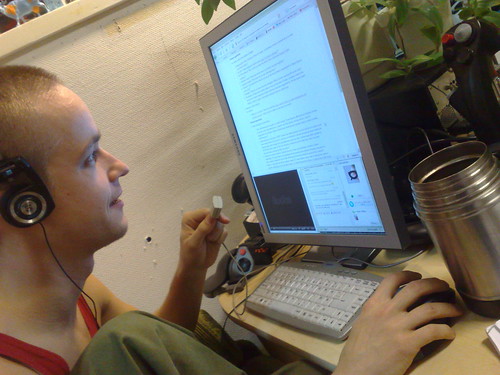
This is a picture uploaded to Flickr by Mace Ojala of him interviewing (by Skype) Benjamin White Intellectual Property Rights Manager from the British Library about the role of libraries in relation to user generated content. Mr Ojala works for a library and blogs about libraries,digital culture and other matters. His comments here and on his blog are merely personal opinions so are not as authoritative as those from other sources. As well as being a picture about UGC this picture is also UGC itself!
Subscribe to:
Posts (Atom)